WLED Music Sync for LED Strips
30 LedFX-style effects that make your strip react to music, drawn on your phone or computer. No PC running LedFX, no microphone on the strip.
Why it feels crisp
We studied how LedFX draws its strip effects and built the same habits in.
60 frames a second
A fresh frame for every send, instead of 25 a second smoothed in between.
Every hit, not just the beat
Sudden rises across the spectrum fire sparks and strobes on each drum and hi-hat.
Real contrast
Quiet parts go dark and peaks light up, so the strip isn't stuck half-lit.
Hard edges
Light jumps on instantly and fades fast, the way a good visualizer should.
30 effects for strips
In the style of LedFX
- Energy: lows, mids and highs fill out from the centre in three colours
- Power: the bass punches a bar out and every hit throws sparks
- Scroll: the music streams from the middle to both ends
- Wavelength and Bands: the spectrum along the strip
- Rain and Water: drops and waves where the sound jumps
- Meter, Beat Bar, Multi Bar, Scan & Flare
- Real Strobe, Glitch, Melt & Sparkle, Lava Lamp
In the style of WLED, and our matrix effects
- Gravity: a bar from the centre whose tips fly up and fall back
- Pitch Wave: the loudest note's colour streams outwards
- Puddles: pools of colour on every hit
- Volume Pulse, Mirror, Bass Fire, Starburst, Particles, Ripple, Spotlights, Beat Drop, Plasma, Lightning, Strobe
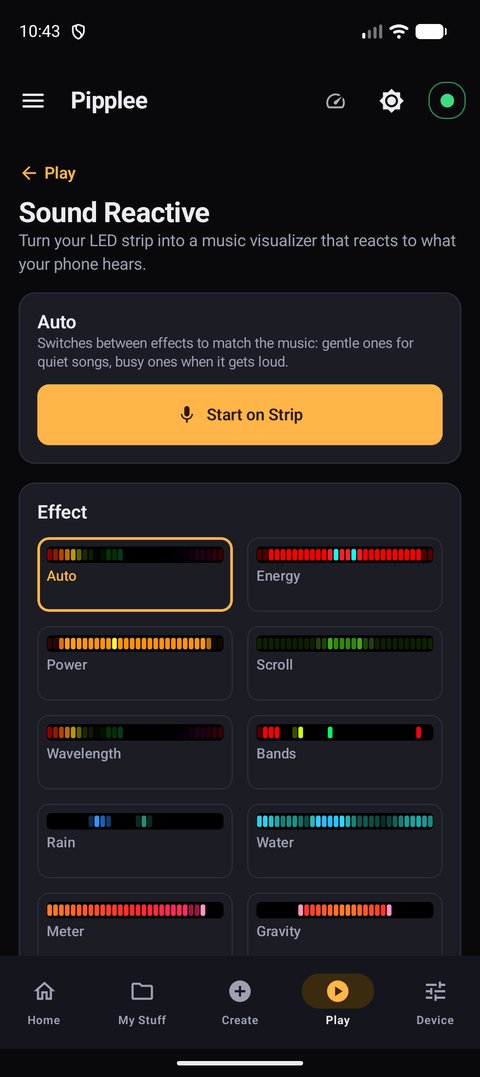
- Auto: switches effects to suit the song, calm ones for quiet music and busy ones when it gets loud
Strobe effects flash at most 3 times a second and warn you before the first use.
Placement and tuning
Strips go round ceilings, desks and TVs, so every effect can be placed and tuned to fit. It works on all 30 effects and Auto.
Placement (saved per strip)
- Start at LED: pick the LED the effect starts from, for example the corner of a ceiling. The start LED lights white while you move the slider.
- Reverse: run the effect the other way round.
- Mirror: draw from the middle out to both ends.
Tuning, like LedFX
- Listen to: all of the sound, or only bass, mids or highs.
- Trail: lit LEDs fade out instead of switching off.
- Blur: soft edges between LEDs.
How to sync your strip to music
- Connect your WLED strip in Pipplee (it finds it on your Wi-Fi). New to strips? Start with the LED strip guide.
- Open Play → Sound Reactive. Every tile shows its effect moving on a little strip.
- Pick an effect and its colours, choose Microphone or Phone audio (Android), and tap Start on Strip.
- Leave it running in the background while your music app plays.
Running Sound Reactive on a matrix instead? See Sound Reactive for matrices.
Frequently asked questions
Make your strip dance
Free to download on Android, iPhone, Mac and Windows.